Control Flow in JavaScript: If, Else, and Switch Explained
When writing programs, we often need to make decisions.
For example:
If it's raining -> take an umbrella
If age >= 18 -> allow voting
If marks >= 90 -> grade A
This decision making process in programming is called: Control Flow
What Does Control Flow Mean?
Control flow decides:
Which part of the code runs and when.
Normally JavaScript runs code from top to bottom.
But with control flow:
Code can be skipped
Code can be branched
Code can choose different paths
Think of it like a traffic signal.
It controls which direction moves forward.
The If Statement
The if statement runs code only if the condition is true.
Syntax:
if(condition) {
    //Code runs if the condition is true
}
Example: Checking age
let age = 20;

if(age >= 18) {
    console.log("You are eligible to vote");
}
Step-by-Step Execution:
ageis assigned the value 20.JavaScript checks: whether
age >= 18.Condition is
trueCode inside
{}runs.
Output
You are eligible to vote.
The if-else Statement
Sometimes we want
One block if true
Another block for false
we use if-else .
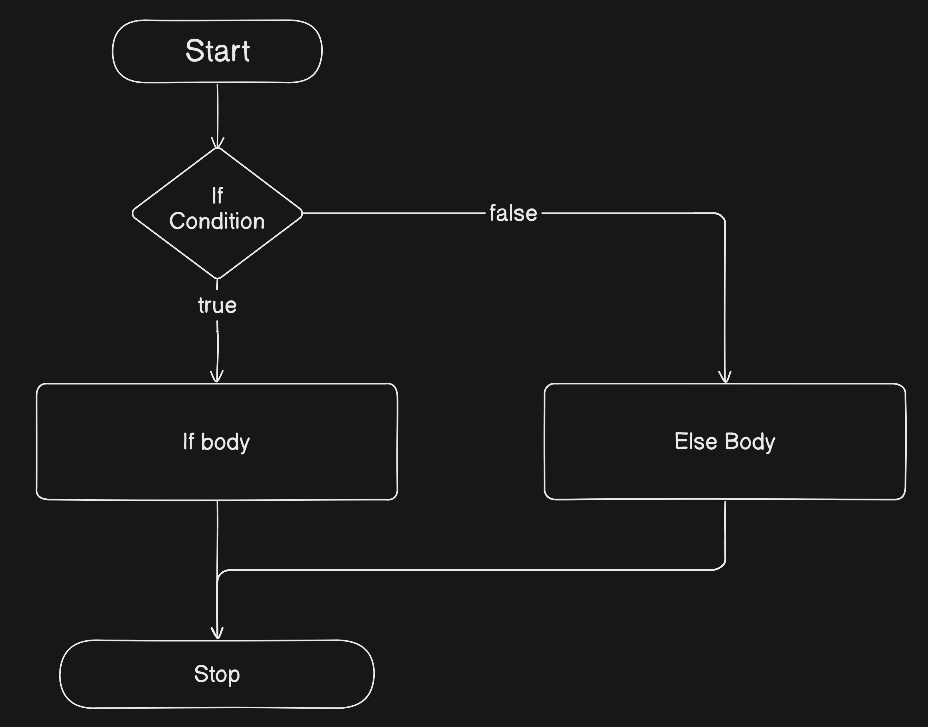
Syntax:
if(condition) {
    //Code runs if condition is true.
} else {
    //Code runs if condition is false.
}
Example: Pass or Fail
let marks = 45;

if(marks >= 50) {
    console.log("You Passed");
} else {
    console.log("You Failed.");
}
Step-by-Step Execution:
marks = 45
Check: 45 >= 50 -> false
Skip
ifblockRun
elseblock
Output:
You Failed.
The else-if Ladder
Used when we have multiple conditions.
Syntax:
if(condition1) {

} else if(condition2) {

} else {

}
Example: Grading System
let marks = 75;

if(marks >= 90) {
    console.log("Grade A");
} else if(marks >= 70) {
    console.log("Grade B");
} else if(marks >= 50) {
    console.log("Grade C");
} else {
    console.log("Fail");
}
Step-by-Step Execution:
If marks = 75
Check
75 >= 90--> falseCheck
75 >= 70-->truePrint
"Grade B"Stop Checking further condition
Important: Once the condition is true, the rest are skipped.
The switch Statement
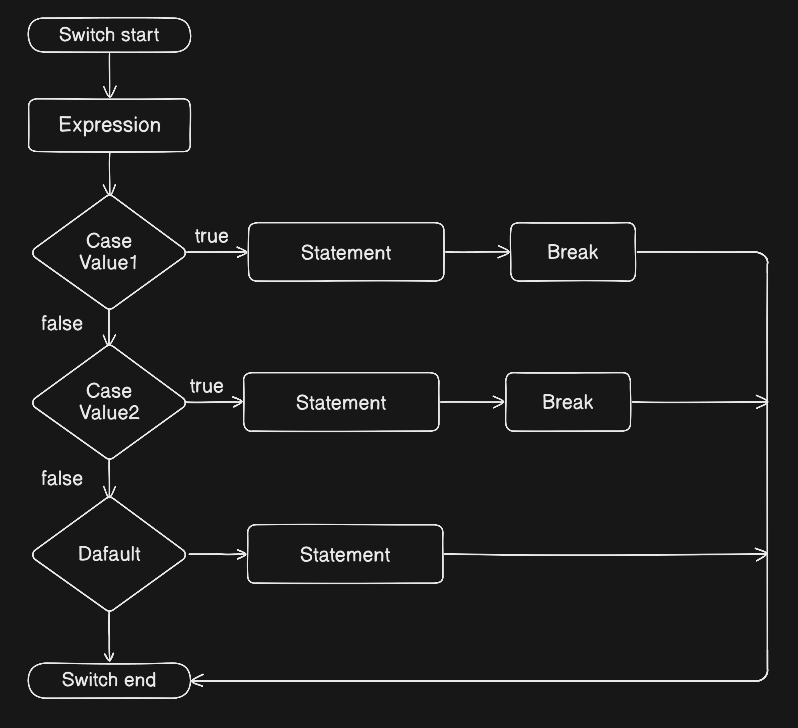
The switch statement is used when we want to compare one value against many possible fixed values.
Syntax:
switch(expression) {
    case value1:
        //code
        break;
    case value2:
        //code
        break;
    default:
        //code
}
Example: Day of the week
let day = 2;

switch(day) {
    case 1:
        console.log("Monday");
        break;
    case 2:
        console.log("Tuesday");
        break;
    case 3:
        console.log("Wednesday");
        break;
    case 4:
        console.log("Thursday");
        break;
    case 5:
        console.log("Friday");
        break;
    case 6:
        console.log("Saturday");
        break;
    case 7:
        console.log("Sunday");
        break;
    default:
        console.log("Invalid Day");
}
Step-by-Step Execution
If day = 2
Compare with case 1 --> false
Compare with case 2 --> true
Print
"Tuesday"breakstops executionExit switch
Why break is Important:
If we remove break , JavaScript continues running the next cases.
Example without break:
case 2:
    console.log("Tuesday");
case 3:
    console.log("Wednesday");
Output would be:
Tuesday
Wednesday
This is called fall-through behavior.
Always use break unless you intentionally want fall through.
When to Use switch vs if-else
Use if-else when |
Use switch when |
|---|---|
| Checking ranges (age > 18) | Comparing one value |
| Complex Conditions | Fixed known values |
| Logical Expression | Menu option |
Real Life Decision Example
Imagine:
If temperature > 35 --> "Very Hot"
If temperature > 20 --> "Warm"
Else --> "Cold"
That's perfect for if-else .
But:
If role is "admin"
If role is "user"
If role is "guest"
That's better for switch.
Assignment Ideas
Check Position, Negative or Zero. (Try to do it on your own first.)
let number = -5;

if(number > 0) {
    console.log("Positive");
} else if(number < 0) {
    console.log("Negative");
} else {
    console.log("Zero");
}
Print Day of the week Using switch
let day = 4;

switch (day) {
  case 1:
    console.log("Monday");
    break;
  case 2:
    console.log("Tuesday");
    break;
  case 3:
    console.log("Wednesday");
    break;
  case 4:
    console.log("Thursday");
    break;
  case 5:
    console.log("Friday");
    break;
  case 6:
    console.log("Saturday");
    break;
  case 7:
    console.log("Sunday");
    break;
  default:
    console.log("Invalid day");
}
Final Thoughts
Control flow is the backbone of programming logic.
By understanding:
ifif-elseif-else if-elseswitch
We can build programs that can make decisions like us.


